It’s 2 AM on a Saturday and someone’s dog just ate chocolate, their cat stopped breathing normally or their puppy got into the trash and now won’t stop vomiting. They’re terrified, grabbing their phone, and typing “emergency vet near me” into Google.
The question is: will they find you, or will they find your competitor three blocks away?
Emergency calls are some of the most valuable clients your practice can get. They’re high-intent (meaning they need help right now and they’re ready to pay for it), they often turn into loyal long-term clients, and they fill your schedule during off-peak hours when you actually want the business.
But if your vet clinic isn’t showing up in search results when pet owners need emergency care, you’re losing those clients every single week.
Here’s how to make sure panicked pet owners find you first when their animal needs help fast.
What You’ll Learn in This Article
- What pet owners type into Google when their pet needs emergency help
- How to show up when pet owners search “emergency vet near me”
- How to answer the questions panicked pet owners are asking online
- How to make sure your clinic is the first one scared pet owners find on Google
- Key Takeaways + FAQ
What pet owners type into Google when their pet needs emergency help
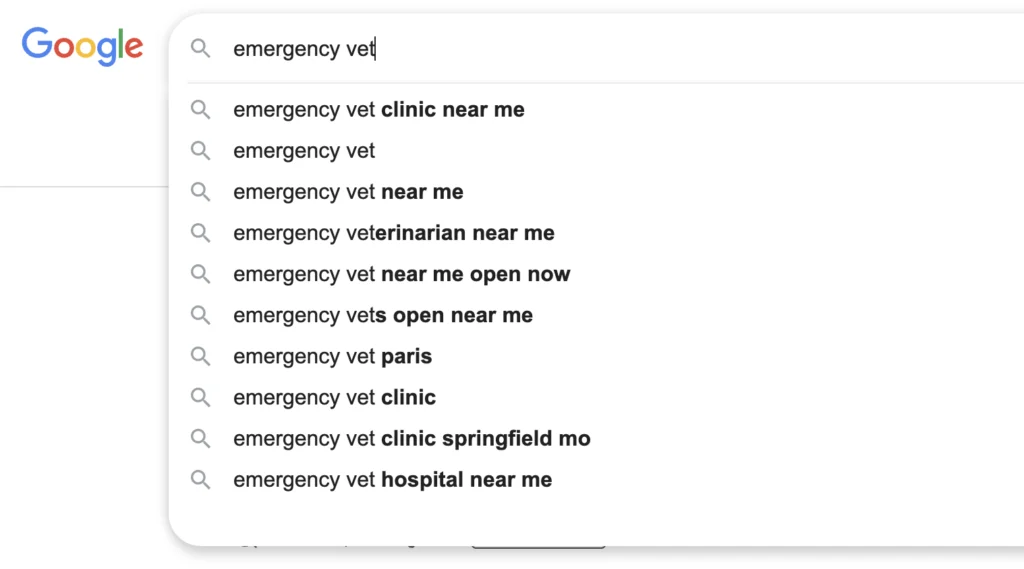
When a pet owner is panicking, they search like a scared person who needs answers immediately. Understanding what they actually type into Google is the first step to making sure your clinic shows up.
Here are the most common emergency vet searches:
- “emergency vet near me” or “emergency vet (your town)
- “24 hour vet near me”
- “vet open now”
- “after hours vet care (your city)”
- “emergency vet open on Sunday”
- “my dog ate chocolate what do I do”
- “cat not breathing normally”
- “puppy won’t stop vomiting”
Notice how specific some of these are? Pet owners aren’t only searching for “vet,” they’re searching for solutions to the exact problem happening in front of them right now.
If your website and Google Business Profile don’t include these phrases (especially the ones tied to your location and your hours), Google won’t know to show your clinic to people who need you.
What to do:
Make sure your website mentions emergency services clearly, uses your city name in the content, and lists the types of emergencies you handle (poisoning, trauma, difficulty breathing, seizures, etc.). This helps Google match your clinic to what people are searching for.
Also, make sure to mention the emergencies you handle: do you accept emergencies during your opening hours only or do you also deal with emergencies at night, during weekends and holidays? It’s very important.
The former vet clinic I used to go to would tackle emergencies at night and during the weekends, but not during the day. This is important for people to know.
How to Show Up When Pet Owners Search “Emergency Vet Near Me”
When someone searches “emergency vet near me” or “vet open now,” Google pulls results from a combination of your website and your Google Business Profile. If either one is missing key information, you won’t show up, or worse, you’ll show up but pet owners won’t call because they can’t tell if you’re actually open or available.
Here’s how to fix that.
Make your Google Business Profile work for emergency searches
Your Google Business Profile is the first thing Google shows people when they search for a vet in your area. If it’s not optimized for emergency searches, you’re invisible to those who need you most.
Update your hours to reflect after-hours availability.
If you offer emergency services outside regular business hours, make sure your profile says so. Use the “Special Hours” feature to mark holidays or weekends when you’re available. If you’re 24/7, make that obvious.
Add “Emergency Veterinary Service” to your categories.
Google lets you choose multiple business categories. Don’t just pick “Veterinarian,” add categories like “Emergency Veterinary Service” and “Animal Hospital” so you show up for emergency-specific searches.
Post updates about your emergency availability.
Google Business Profile lets you create posts (kind of like mini announcements). Use them to remind people you’re open for emergencies on weekends, holidays, or late nights. It shows up in your profile and signals to Google that you’re active and relevant. Think of it as “marking extra points” for Google to push you up to the top of searches.
Respond to reviews quickly.
When someone leaves a review (especially about emergency care), respond fast. It shows you’re paying attention and builds trust with future clients who are reading those reviews in a panic at 3 AM.

Optimize Your Website for Emergency Searches
Your Google Business Profile gets people to notice you, but your website is what convinces them to call. If your emergency services page is buried or unclear, you’re losing clients even after they find you.
Create a dedicated emergency services page.
Don’t bury emergency info into a general “Services” page. Give it its own page with a clear URL like “/emergency-vet-services”.
This makes it easier for Google to understand what the page is about, and it makes it easier for pet owners to find the info they need.
Also make sure to list examples of the emergencies you handle.
Be specific, say things like “We treat poisoning, trauma, difficulty breathing, seizures, and other urgent pet health issues.” When someone Googles “my dog ate grapes emergency vet,” and your page mentions poisoning, Google is more likely to show your site because it understands context.
Use your location in the page content.
Include phrases like “emergency vet in (your city)” and “after-hours vet care in (your neighborhood).” It helps Google connect your clinic to local searches.
Location-specific content matters. Make sure to mention your city, neighborhood, and nearby landmarks on your website (not only on your emergency page).
The more Google sees that you’re connected to a specific location, the more likely it is to show your clinic for “near me” searches in that area.
Make your contact info impossible to miss.
Put your phone number at the top of the page in big, bold text. Add a click-to-call button so people on mobile can tap and dial immediately. Include your exact address and a map so they know how to get to you fast, you can also include the GPS coordinates and make sure to let them know if there’s a parking lot available, if it’s paid parking or free.
Explain what happens when they arrive.
Panicked pet owners want to know what to expect. A sentence like “When you arrive, our team will assess your pet immediately and start treatment right away” is reassuring and builds trust even before they walk through the door.
How to show Up for “Near Me” Searches
“Near me” searches are huge for emergency vets because people are looking for the closest option when time matters. Google decides who shows up based on a few key factors:
Your NAP needs to be consistent everywhere
NAP stands for Name, Address, Phone number. If your clinic’s info is slightly different on your website, Google Business Profile, Yelp, and Facebook (like “St.” vs “Street” or an old phone number), Google gets confused and might not show you. Make sure it matches exactly across every platform.
Your website needs to be mobile-friendly.
Most emergency searches happen on a phone. If your site takes forever to load or looks broken on mobile, people will bounce and Google will show you lower in search results. Test your site on your phone and make sure it’s fast and easy to use.

Answer the questions panicked pet owners are asking online
Pet owners don’t always know if their situation is an emergency. They’re searching things like “is it bad if my dog ate chocolate” or “do I need an emergency vet if my cat is limping.”
If your website answers these questions, you show up in search results AND you position yourself as the helpful, trustworthy vet they should call.
Create an FAQ section or blog posts that answer common emergency questions.
Examples:
- “What should I do if my dog ate chocolate?”
- “Is this a pet emergency or can it wait until morning?”
- “Signs your cat needs emergency vet care”
- “What to do if your puppy is vomiting”
You’re not trying to replace an actual vet visit with these answers. You’re giving pet owners enough information to know whether they need to rush in, and you’re building trust by being the one who helped them when they were scared.
At the end of each answer or blog post, include a clear next step like “If your pet is showing any of these symptoms, call us immediately at (your phone number). We’re available 24/7 for emergencies.”
Make sure to use the exact language pet owners use.
Don’t write “toxicity ingestion,” write “my dog ate something poisonous.” Match how people actually talk and search, and Google will match your content to their queries.
Pet owners have no medical knowledge and a panicked pet owner won’t take time to guess what you’re trying to say, even if you have the answer to their problem. If you’re using complicated terms, you’ve lost them.
How to make sure your clinic is the first one scared pet owners find on Google
Emergency vet searches are valuable, high-intent, and happening right now in your area. If your Google Business Profile and website aren’t optimized for these searches, you’re losing clients to competitors who are easier to find.
The good news is that most vet clinics aren’t doing this well, so small changes can make a huge difference in how many emergency calls you get.
Want to know if your website is actually showing up when pet owners need emergency care?
Book your free Vet Website Audit: I’ll review your site and your Google presence before we talk, then we’ll spend 20 minutes going over exactly what’s holding you back (whether it’s vague copy, missing local info, or a confusing layout).
You’ll walk away knowing:
- What’s stopping your website from bringing in more emergency clients
- Which fixes will have the biggest impact on getting you found and chosen
- A custom quote based on what your practice actually needs (no cookie-cutter packages)
This is a real audit with actionable feedback. Even if we don’t work together, you’ll know exactly what to fix.
Pick a time that works for you, answer a few questions so I can review your site before we chat, and you’ll get the confirmation and Zoom link by email.
I’m looking forward to meeting you,
Morgane

Key Takeaways
- Pet owners search for phrases like “emergency vet near me,” “vet open now,” and specific problems like “my dog ate chocolate.”
- Your Google Business Profile needs accurate hours, emergency service categories, and quick review responses to show up in local searches.
- Your website needs a dedicated emergency services page with clear contact info, your location, and a list of emergencies you handle.
- Answering common emergency questions on your site helps you show up in search and builds trust with panicked pet owners.
If you fix these areas, more pet owners will find your clinic when their animal needs help, and you’ll stop losing emergency calls to competitors who are easier to find online.
FAQ – How to get found by clients as an emergency vet
Should I run Google Ads for emergency vet searches
Google Ads can work if you want immediate visibility, but they’re expensive for competitive keywords like emergency vet near me. If your Google Business Profile and website are optimized, you’ll show up organically without paying per click. Save your ad budget for slower months or use it to promote specific services instead of relying on it for every emergency search.
Can I show up for emergency searches if I’m not open 24/7
Yes. You don’t need to be open around the clock to capture emergency searches. If you offer after-hours care on weekends or certain evenings, make that clear on your Google Business Profile and website. Pet owners searching for help on a Saturday night will still find you if your hours say you’re available then, even if you’re not truly 24/7.
What if another vet clinic has been around longer than mine
Being newer doesn’t automatically hurt your ranking (meaning which position you’re showing up on Google). Google cares more about relevance, accurate information, and how well your site answers what people are searching for. If your Google Business Profile is optimized and your website clearly explains your emergency services with local keywords, you can outrank older clinics that haven’t updated their online presence in years.
My own vet is the newest in town, since he’s hired me to optimize his website, he’s surpassing his competitors who’ve been there for decades. He even gets recommended by AI tools.
Do reviews actually help me show up for emergency vet searches
Yes. Google looks at the quantity and quality of your reviews when deciding which vet clinics to show for local searches. More recent reviews signal that your clinic is active and trustworthy. Responding to reviews quickly also helps because it shows you’re engaged, which matters even more for emergency services where people need to trust you’ll be responsive.
How long does it take to start showing up for emergency vet searches
Changes to your Google Business Profile can show up within a few days. Website updates go live immediately but can take a few days to 2 weeks to show up in Google search results (I usually accelerate this for my clients). The sooner you optimize, the sooner you start capturing those high-value emergency calls instead of losing them to competitors.
Make sure to book your free veterinary website audit below to walk away with clear actionable steps to appear on top of search results and get more clients.