Quick answer
You don’t need expensive tools to find the right keywords for your website. Start with what your clients actually type into Google, not the professional language you use with colleagues. Use Google autocomplete, related searches, competitor research, and your own Google Search Console data to build a solid keyword list for free. Focus on specific and very specific keywords first, they’re easier to rank for and bring in people who are ready to hire you.
You want to be found on Google, but how to finds keywords when all the SEO tools cost an arm and a leg? It’s not that you don’t want to pay… But since SEO isn’t your main job, there’s no real point in paying for it.
Good news: you can find the best keywords without spending money. I’ll show you how using 100% free SEO tools you already have.
Here’s what we’ll cover:
- How to find relevant keywords
- Free keyword research tools
- Spy on your competitors (legally)
- Google Business Profile & Google Search Console give you specific keywords
- YouTube, Facebook groups, and forums: your secret allies
- How to know if a keyword is worth it
- The 3-level rule for the best keywords
- Your free action plan for keywords that bring traffic (+ the trap to avoid)
- FAQ

How to find relevant keywords : Start with what you already know
Before diving into complicated tools, pause and think for 5 minutes.
If you needed to work with a professional like yourself, what would you type into the Google search bar?
Asking yourself this simple question helps you step away from expert knowledge and the “professional” language you use with your colleagues (language your clients don’t actually speak).
If you’re a divorce lawyer: “divorce lawyer + your city,” “quick divorce process,” “how much does a divorce cost”…
If you’re a veterinarian: “veterinarian + your city,” “emergency vet,” “dog vaccination”…
Write down 10-15 words or phrases your potential clients might type. Don’t overthink, just jot down what comes naturally.
This list will be your starting point. You’ll be surprised to see it already contains your most important keywords.
Take note of your clients’ words and use their testimonials
How do your current and past clients describe your services when they leave reviews or share testimonials?
How do they talk about you to their friends?
❌ They don’t say “I consulted a tax optimization expert.” ✅ They say “I saw an accountant to pay less taxes.”
This difference is crucial. Your clients use simple language, therefore your website should too.
Note the exact phrases your clients use in testimonials, emails, or conversations. That’s exactly what they type into Google.
Free keyword research tools: Google is your best friend
Google Autocomplete
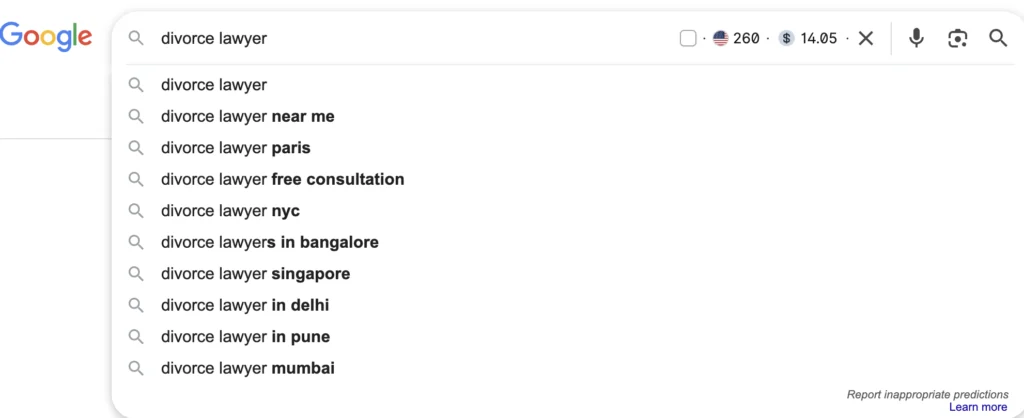
Type the beginning of your keyword into Google and see what it suggests (this is called autocomplete, Google suggests the end of your sentence, you’ll see several possibilities):
- “divorce lawyer” → Google suggests “amicable divorce lawyer,” “divorce lawyer + city,” (see screenshot below as an example)
- “veterinarian” → “emergency veterinarian,” “veterinarian near me” + different cities
These suggestions are gold. Google shows you exactly what people are really searching for.
Related Searches
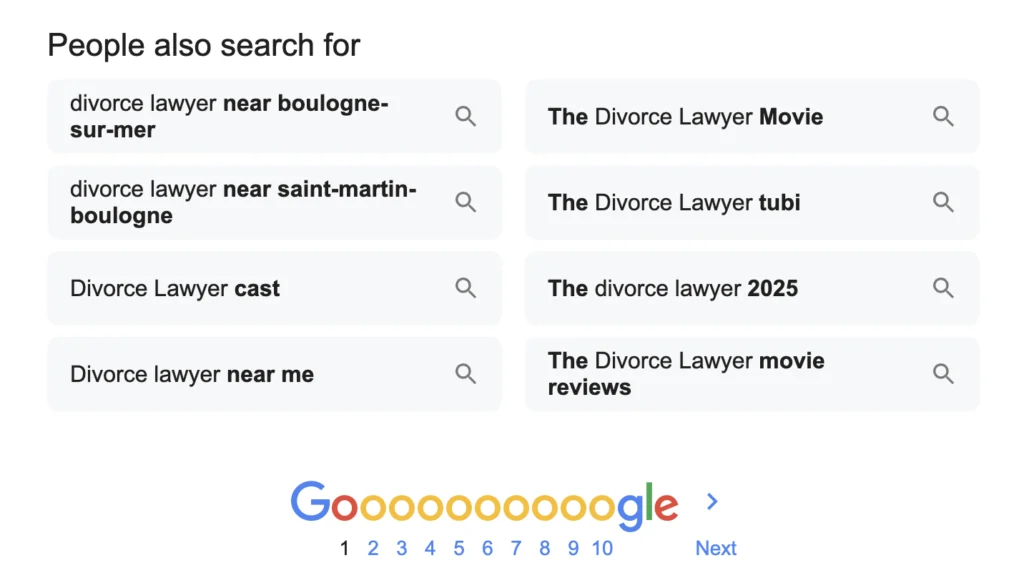
At the bottom of any Google search results page, you’ll see “Related searches”. It’s a keyword goldmine!
Search for one of your main keywords, scroll to the bottom, and note the 8 suggestions. Then click on one and repeat.
In 10 minutes, you’ll have 30-40 free keyword ideas, and you’ll know these keywords already generate searches (and interest).
Spy on your competitors (Legally)
Go to your top 3 competitors’ websites. Look at:
- Their page titles: They often contain their main keywords
- Their blog articles: Titles show their target keywords
- Their service pages: How they describe what they do
NOT to copy – we never do that! You’re simply researching, observing, and seeing what you can improve so YOU can stand out.
If your competitor targets “digital marketing consultant,” you might aim for “online marketing consultant” or “digital marketing expert + your town”
Inside Sold Out SEO, my 6-month program with a self-paced course, live calls and community support, I walk you through finding the exact keywords your ideal clients are searching for and show you where and how to use them on your site so Google actually finds you. Explore Sold Out SEO here.
Google Business Profile & Google Search Console give you specific keywords
If you have a Google My Business listing, go to the “Insights” tab.
You’ll see searches that show your listing: “lawyer near me,” “veterinarian open Sunday”…
Same with Google Search Console, you’ll see queries your site appears for (what people actually type and which ones bring the most clicks.
People are already typing these terms to find you. Make sure they’re on your website.
YouTube, Facebook groups, and forums: your secret allies
YouTube
Search for questions related to your field with “how to”:
- “how to choose a lawyer”
- “how to care for your dog”
- “how to do accounting”
Popular videos show you the questions your prospects are usually asking. Check the comment sections to see the types of remarks, questions and conversations people have.
Forums and Facebook Groups
Find groups where your potential clients hang out. Note their recurring questions.
“Anyone know a good veterinarian in Boston who specializes in reptiles?” → keyword: “veterinarian for reptiles in Boston”
“How to get an amicable divorce in Austin?” → keyword: “amicable divorce in Austin, Texas”
If you want to dive deeper on how to leverage these platforms to build a long-term visibility marketing system that works for you even when you’re on holiday, you’ll learn these inside Sold Out SEO. Discover all the details here.
How to know if a keyword is worth it
Simple test: type your keyword into Google.
If you see:
- Sites like yours in the top results ✅
- Google Ads ✅
- Only a few to no big sites (Wikipedia, news sites…) ✅
Then this keyword can work for you.
If you only see:
- Wikipedia, magazines, huge sites ❌
- No Google Ads ❌
- Results completely unrelated to your business ❌
Then move on to the next one, because it’s really hard to compete against huge websites that are internationally known and established for decades (not impossible though). Rinse and repeat.

The 3-Level Rule for the best keywords
Your strategy should cover 3 levels:
1) Broad: “lawyer,” “veterinarian,” “accountant” → Lots of searches but very competitive because it’s too generic
2) Specific: “divorce lawyer,” “cat veterinarian,” “small business accountant” → Good balance of searches vs competition
3) Very Specific: “amicable divorce lawyer Boston,” “emergency veterinarian Sunday Chicago” → Fewer searches but easy to rank and ultra-qualified clients
Start with levels 2 and 3. That’s where you’ll see your first results.
Pro tip: I actually recommend starting directly with level 3. The more specific, the better, thanks to long-tail keywords (keywords made of several words like “reptile veterinarian in city + zip code”).
Your free action plan for keywords that bring traffic
- Make your list of 15 obvious keywords
- Use Google autocomplete
- Check related searches
- Study 3 competitors’ sites
- Check your Google My Business & Search Console stats
In about 75 minutes, you’ll have a solid keyword list, without spending a dollar.
Keyword research trap to avoid
Don’t choose keywords based on what YOU want people to type. Choose them based on what your CLIENTS actually type.
You call yourself a “Workplace Wellness Facilitator”, but your clients are actually searching for: “stress at work help” or “how to motivate my employees.”
Speak their language, not yours.
Now That You Have Your Keywords?
This is just the beginning. The real question is where and how to use them on your site so Google finds you?
Because keyword stuffing doesn’t work anymore, it’s counterproductive (yes, Google penalizes you!).
You now have the tools to find great keywords for free. The next step is knowing where and how to use them on your site so Google actually shows you to people searching for what you offer.
Inside Sold Out SEO, my 6-month program with live support, you’ll learn how to find the right keywords, use them strategically across your website, and build a visibility system that keeps bringing in clients long after you set it up.
One of my clients, a veterinarian, is now getting found for 317 keywords and another one for over 1000 keywords because we fixed exactly what this blog covers.
Your turn,
Morgane
Sales Copywriter & SEO Strategist for service providers and practice owners

Blog updated in May 2026
FAQ – How to choose keywords for SEO with free tools
Focus on one main keyword per page, then sprinkle 2 to 3 related keywords naturally throughout the content. Trying to target too many keywords on one page confuses Google and dilutes your ranking potential. Each page on your website should have a clear purpose and speak to one specific search intent. Your homepage, services page, about page, and each blog post should all target different keywords so they complement each other instead of competing.
A long-tail keyword is a phrase made up of 3 or more words, like “emergency veterinarian Sunday Chicago” instead of just “veterinarian.” Long-tail keywords have fewer searches but much less competition, which means you can rank faster and attract people who are already specific about what they need. Someone searching “amicable divorce lawyer Boston” is much closer to hiring than someone just searching “lawyer.” Start with long-tail keywords and work your way up.
Do a thorough keyword research session when you first set up or redesign your website, then revisit it every 6 to 12 months. Search trends change, new competitors enter your market, and your services evolve. You should also do keyword research every time you write a new blog post or add a new service page. It doesn’t have to take long once you know the process, 30 to 60 minutes is enough to find solid keywords for a new piece of content.
Yes, but be strategic about it. If a competitor is already ranking well for a broad keyword, target a more specific version of it instead. For example if they rank for “business coach” you might target “business coach for female entrepreneurs in Austin.” You can also look at what keywords they’re NOT targeting and fill those gaps. The goal isn’t to copy their strategy but to find the spaces where you can stand out and rank without competing head to head with established sites.
The process is similar but the keyword research process is different. Product businesses target what people want to buy. Service businesses target the problem people need solved. Your keywords should reflect what your ideal client is struggling with and searching for help with, not just the name of your service. “How to pay less taxes” will bring you more qualified leads than “tax optimization services” because it matches how real people describe their problem before they even know what service they need.
Ready to turn your website into your most reliable client source?